Anyone can tick boxes. This reads your chart, and you.

ImprintTrader scores every setup out of 100 against your own rules and reference charts. On Pro, it learns how you trade after a loss, so you can fix it at the source.

Start free
✓ 10 free credits✓ No card needed✓ Behavioural scores on Pro
ExampleImprint Score · Before entry
86
A
Swing Reversal · NAS100
Higher-timeframe structure
15/15
Lower timeframe + signal bar
13/15
Entry & stop
9/10
Risk / reward
9/10
Indicator match
13/15
Price-structure match
11/15
Timeframe relationship
8/10
Overall pattern
8/10

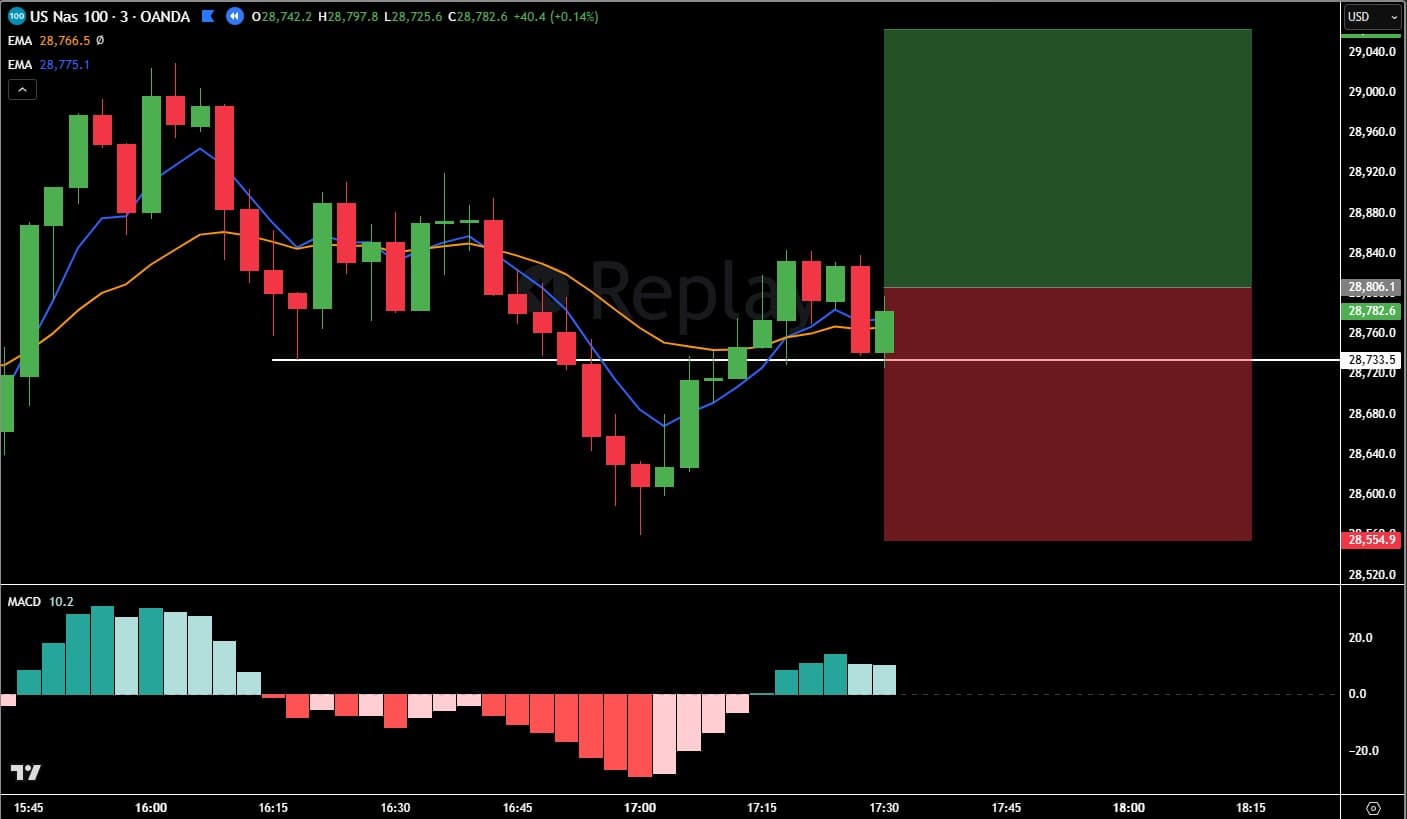
A clean expression of your Swing Reversal. Price swung down into your white swing level and reclaimed it — the 3-minute signal bar undercut the prior bar and closed back above the level, exactly as your imprint defines it.

The one soft spot is price structure — the reversal shape is close to your reference but not a perfect mirror, which is what keeps this in the mid-80s rather than the 90s.

You know your rules. You break them anyway.

Not every time. When a setup is nearly there, when the market is moving, when you're one loss down. ImprintTrader is for three kinds of trader: the day trader who wants a check at exactly that moment, the trader whose coach keeps them to a playbook, and the trader testing which part of a strategy really works.

Day traders

Futures and prop-firm accounts included

Without it

“Close enough.” You're in before you've checked the one rule that matters, and one red trade later the next entry is a revenge trade dressed up as your setup.

With ImprintTrader

You score it first: a number out of 100 against your own written rules and reference charts, a verdict on each chart, and every rule that wasn't met, by name. A required rule that isn't met holds the score at 55 at most, and on Pro the score screen flags a setup scored straight after a loss.

Traders with a coach

Kept to your coach's playbook, trade by trade

Without it

You learnt the playbook from your coach, but between sessions you drift from it, and they only see the trades you choose to show them.

With ImprintTrader

Your coach shares their Master Imprints through Studio, and you join free on one of their seats, with 75 credits a month to score against their playbook. They see your discipline from the trades you score on their imprints, never the ones on your own, and can give feedback on any of them in the team journal.

Traders testing a strategy

Finding out exactly what in the plan works

Without it

A green week feels like skill and a red one like bad luck. You can't tell which part of your plan is doing the work, and which part isn't.

With ImprintTrader

In Pattern Lab, save a sample each time your setup shows up, and tap the conditions its chart shows. Samples that show exactly the same conditions are one variation, and each variation shows how often it worked and failed, with a hit rate once 5 of its samples have an outcome. Test the best one going forward, then turn it into an imprint. Pattern Lab never uses credits.

Coaching traders? See Studio →

From your rules to a score.

Knowing your rules and following them are two different skills. ImprintTrader measures the second.

01
Once
Write your strategy down
Write your rules in the form, or let an AI builder draft them from your own words or your charts, then add your reference charts. You check every rule before it's saved. Testing a hunch in Pattern Lab first? Start from one of its samples.
02
Each setup
Score it before you enter
Upload a screenshot or paste a TradingView link for each timeframe. A free chart check tells you whether the AI can read what you marked; the score itself uses 1 credit. Too fast to score before each entry? Session Review scores a whole session afterwards.
03
Every score
See what met your rules
A score out of 100 across 8 dimensions, a verdict on each chart (met, partial or not met) and written coaching, saved to your journal. A before-entry score under 60 also lists which of your rules didn't check out. It measures how closely the setup matches your rules and reference charts, not whether the trade will win.

Your 10 free credits build your first imprint and score up to 8 trades.

Two setups that felt the same.

Same trader, same imprint, two days apart. The first is the setup they wrote down. The second is the one they wanted after two losses.

Tuesday · 09:47 · Before entry
Example
86A
Swing Reversal · NAS100
Per-chart verdict
15M — Higher timeframe (context)Met

All conditions on this chart verified.

3M — Lower timeframe (entry trigger)Met

All conditions on this chart verified.

Your decision:
Trade logged as entered. Head to your Journal to log the outcome once the trade closes.
Thursday · 09:52 · Before entry · after two losses
Example
55C
Swing Reversal · NAS100
Held at 55 (dimensions sum to 78) — a required rule was not verified.
Rule gaps found

Not met: The signal bar undercuts the prior bar and closes back above the level (read: the 3-minute signal bar closed below the white swing level)

Before you take this trade

Drawn from this setup (its grade and any emotion you logged). On Pro and Studio it also checks your own trading history: after a loss, weak days, overtrading.

This scored C. Your past C-and-below setups win just 44%, -0.3R average — your edge is in A/B trades. Strongly consider passing.On Pro
Your last trade was a loss — and after losses your trades score about 14 points lower. Make sure this is a fresh setup, not a bounce-back.On Pro
Your decision:
Logged in your Journal as a Passed setup — good discipline.

The 55 is a hold applied in code: when a required rule isn't met, strong scores elsewhere can't add their way past it. The after-a-loss line comes from the trader's own history, on Pro. Neither card is a forecast: an A can lose and a C can win.

Two things decide a trade: the setup and the trader. It reads both.

Every plan

It reads your chart

  1. Each rule you wrote is checked on the chart it belongs to and judged Met, Partial or Not met, with what was read.
  2. The setup's shape is compared with your own reference charts.
  3. Holds are applied in code: miss a required rule, or enter outside your session hours, and the total is held at 55 at most.

→ A score out of 100, a grade, and coaching in plain words.

Pro and Studio

It reads you

  1. Every trade you score becomes your history: its grade, the outcome you log and, if you log it, how you felt.
  2. When you score a setup, your latest trades (up to 40, passed setups left out) are checked for your own tells: after a loss, an emotion you logged, a weak day, overtrading.
  3. Four behavioural scores come from your 30 most recent trades, and Trader Memory reads your latest 150.

→ Your habits as numbers, so you know which one to work on first.

Score your next setup against your own rules.

Start free
✓ 10 free credits✓ No card needed✓ Your first imprint and up to 8 scores
Features

Everything it does, and which plan it's on.

The core is on every plan, Free included: your imprint, the Imprint Score, Session Review, the Journal, Pattern Lab and Daily Routine. Each part below says which plan it's on.

Know whether it's really your setup before you click.

Not close enough. Not the one you talked yourself into. Your setup as you wrote it, checked rule by rule on your own charts.

🎯 Every plan · 1 credit a score

See which rule failed, and on which chart.

Your written rules carry 65 of the 100 points, each judged on the chart it belongs to: higher-timeframe structure, the lower timeframe and signal bar, entry and stop, risk to reward and your indicator rules (write none, and those 15 points follow your reference charts instead). The other 35 are how closely the setup's price structure, timeframe relationship and overall pattern match your own reference charts. You get a grade, a verdict on each chart and coaching in plain words, saved to your Journal on its own.

  • Eight parts, 100 points: Higher-timeframe structure 15, Lower timeframe + signal bar 15, Entry & stop 10, Risk / reward 10, Indicator match 15, Price-structure match 15, Timeframe relationship 10, Overall pattern 10
  • Grades: A from 85, B from 70, C from 55, D from 40, F under 40
  • Score Before entry, In trade or After close; After close judges your pre-entry rules and ignores the outcome
  • A before-entry score under 60, or one held by a rule, lists your rule gaps: each missed rule, with what was read on the chart
  • A red banner warns you when a before-entry setup has already played out or hit your invalidation rule
Imprint Score · Before entry
Example
79BSwing Reversal · NAS100
Per-chart verdict

Each chart judged only against the conditions that belong to it, so you can see exactly which chart has the gap.

Session / time of dayMet

Inside your session — 10:12 New York time on Thu 15 Oct (the moment this was scored).

15M — Higher timeframe (context)Met

All conditions on this chart verified.

3M — Lower timeframe (entry trigger)Partial

Partly met: 6 EMA above 18 EMA. Every other condition on this chart verified.

A 85+B 70+C 55+D 40+F under 40
🔒 Every plan · part of every score

Close enough can't add up to an A.

Some rules aren't up for negotiation, so the score doesn't negotiate them. The holds are applied in code after the AI has read the charts, and they only ever lower a total. When one fires, the screen says so under the number.

  • A required rule not met, or one the chart doesn't let it read: held at 55 at most, a C
  • An entry outside your session hours: held at 55 at most, judged by the clock in code, never read off the chart's time axis (London 08:00–17:00 London time, RTH 09:30–16:00 New York time, the US cash session, or your own window)
  • A before-entry setup that has already played out, run past the level or hit your invalidation rule: held at 45 at most, under a red banner
  • An A+ must-have the chart doesn't show: it cannot be above 84, a B at most, but it is never a failed setup
  • Trade both directions? A short against rules written for the long is judged against the mirror of each rule, or against your own opposite-direction conditions
Before entry
Example
C
55
Imprint Score out of 100
Held at 55 (dimensions sum to 81) — this entry was outside your imprint’s session hours (see “Session / time of day” in the per-chart verdict below).
Session / time of dayNot met

Outside your session — 09:12 New York time on Thu 15 Oct (the moment this was scored). Your session: Regular session (RTH) (09:30–16:00 New York time, the US cash session).

Holds on the total
45the setup is no longer live at the current bar
55a required rule was not verified, or the entry was outside your session hours
84an A+ must-have was not seen on the charts

Holds only ever lower a score.

📎 Every plan · the chart check is free

Never spend a credit on a chart the AI can't read.

Drop a screenshot, paste it with Ctrl+V, add a TradingView snapshot link, or take a photo of your screen on your phone. Then run the free chart check: the AI tells you whether it can see each indicator and marking your imprint needs, before a credit is spent.

  • Each item comes back visible, unclear or not visible, with up to 3 rounds to fix it, or Proceed anyway
  • The Checklist tab shows your imprint's conditions as you wrote them, for a self-check before you pay
  • Type your entry, stop and target, and risk to reward is worked out from your prices instead of read off the chart
  • The chart check is fair use: up to 30 a day on Free and 250 on a paid plan
Score a trade
Example
3M · Lower timeframe (entry trigger)
Drop, paste or browse
Take a photoAdd a TradingView link
Chart check 1 of 3
White swing level — VISIBLE
MACD histogram — VISIBLE
6 EMA and 18 EMA — UNCLEAR: the two lines overlap at the right edge.
Re-check chartsProceed anyway
🧠 Every plan · your own history on Pro and Studio

A tap on the shoulder before the revenge trade.

The score screen checks you as well as the chart. On every plan it flags a C, D or F grade and a FOMO, revenge or overconfident state you logged. On Pro it adds your own history: how your past low-grade setups turned out, how your trades score straight after a loss or in that state, your weakest day and overtrading.

  • Log how you feel going in: Calm, Slightly anxious, FOMO, Revenge trading, Overconfident. It's optional and never changes the score
  • Knew it broke your rules? Tick Override before you score and give your reason, so the record stays honest (it earns the Honest Trader badge)
  • Then decide: Enter trade, or Pass — wait for a better setup
  • A pass is kept as a Passed setup: it never breaks a streak or drags your discipline score, and on Pro a pass on a C, D or F counts towards your Patience score
Imprint Score · Before entry
Example
Before you take this trade

Drawn from this setup (its grade and any emotion you logged). On Pro and Studio it also checks your own trading history: after a loss, weak days, overtrading.

On every plan
This scored C — it has drifted from your imprint. Low-grade setups are exactly where discipline is won or lost.
You logged "Revenge trading". Emotional entries are your highest-risk trades — slow down and double-check the setup.
On Pro, from your own history
This scored C. Your past C-and-below setups win just 44%, -0.3R average — your edge is in A/B trades. Strongly consider passing.
Your last trade was a loss — and after losses your trades score about 14 points lower. Make sure this is a fresh setup, not a bounce-back.
You logged "Revenge trading". Those trades score about 12.9 points lower than when you're calm — your worst entries come from this state.
Your decision:
Enter tradePass — wait for a better setup

Score the trade you're still thinking about.

Build your imprint, then score last week's trade at After close: your pre-entry rules only, the outcome ignored.

Start free
✓ 10 free credits✓ No card needed

Write your playbook once. Every score is held to it.

Your strategy becomes an imprint: each rule under the chart it's read on, plus your own reference charts. Build it four ways, and check it before it ever costs you a score.

⚡ Every plan · 1 imprint on Free, 3 on Trader, unlimited on Pro and Studio

Master Imprint library

Your strategy, written down once: what each timeframe must show, your entry and stop, your indicators and your reference charts. Every trade is scored against it, not against a generic checklist.

  • Each rule sits under the chart it is read on, exactly as a score checks it
  • Management rules stay on your plan: a score judges the entry, not how you managed the trade
  • Rules lock once a trade is scored against them, so old scores stay comparable — change them on a copy, which needs a spare imprint slot, so not on Free
  • Each imprint's page keeps its trades scored, their average score and how many were graded A or B
  • Start from the worked Swing Reversal example, with its real NAS100 reference charts, or from one of 8 starter templates
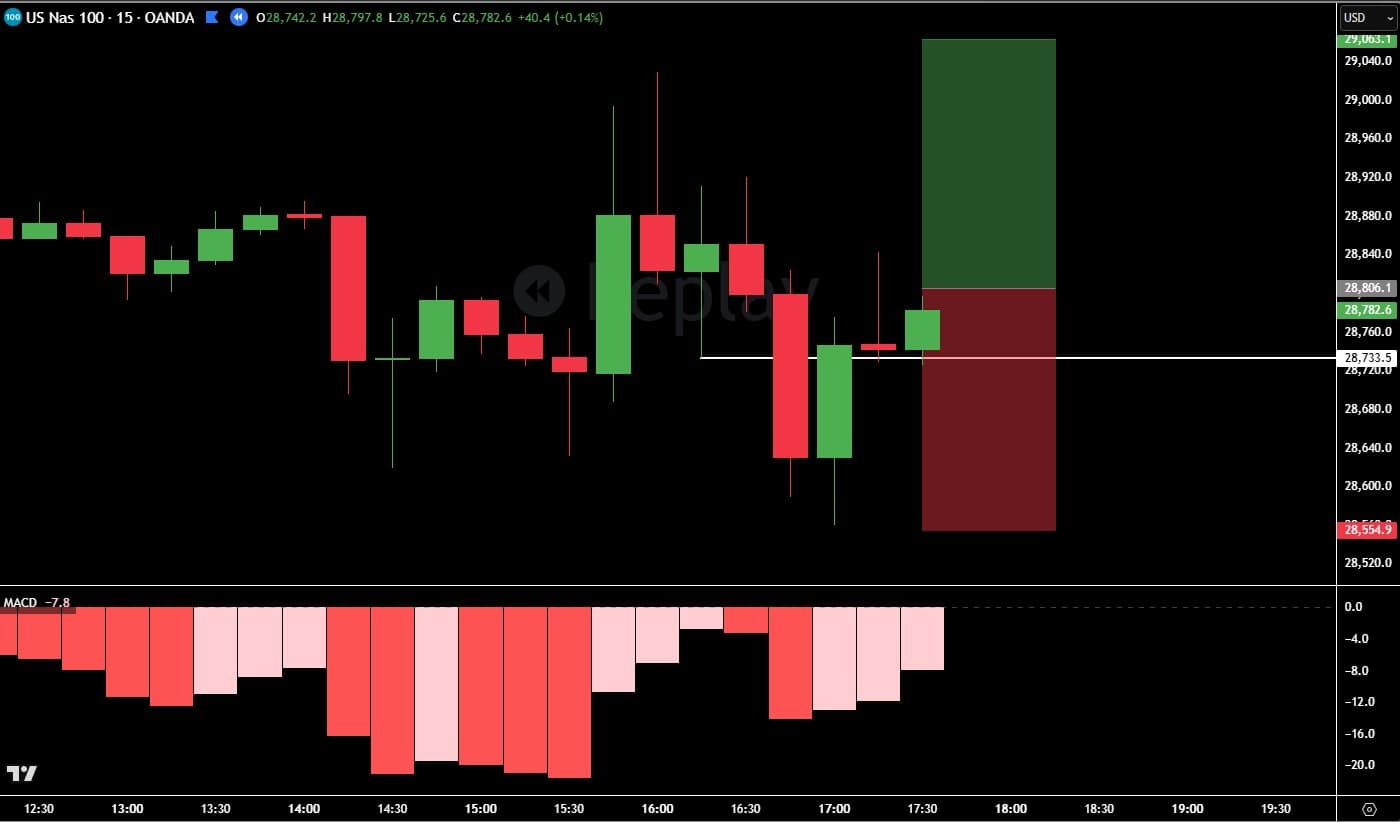
Swing Reversal · NAS100
Example
NAS100 · 15-minute and 3-minute charts
15-minute chart
Price swings down into the white swing level and reverses back above it
MACD histogram rising
3-minute · entry chart
The signal bar undercuts the prior bar and closes back above the level
6 EMA above 18 EMA · MACD histogram green
Entry: a stop order above the signal bar; stop at the pattern low
On your plan, not checked by a score
Move the stop to breakeven at 1R
Reference charts
The example imprint's 15-minute reference chart (NAS100)
15M — Higher timeframe (context)
The example imprint's 3-minute reference chart (NAS100)
3M — Lower timeframe (entry trigger)
✍️ Every plan · 3 credits with an AI builder, 2 with the form

Get the strategy out of your head in one sitting.

Explain your setup the way you'd explain it to another trader: type it, paste your trading plan, or say it out loud. The AI turns it into a structured imprint, asks only about the essentials it can't find, and you read every rule as a playbook before anything is saved.

  • Describe your strategy (recommended): typed, pasted or dictated, with its questions read aloud if you like
  • Build with the AI co-pilot: chat it through, and the AI fills the form for you to review
  • Draft from my charts: the AI reads your indicators, key level, entry, stop and targets into a draft
  • Fill in the form: step by step, for 2 credits
  • One AI build covers 40 turns, and saving its draft within 30 days is included
  • Testing a pattern in Pattern Lab? Turn it into an imprint and the builder opens with a sample's charts in place
New imprint
Example
Describe your strategyRecommended
Write (or paste) your whole strategy in your own words. The AI structures it into your imprint and only asks about essentials it can't find — you review a readable playbook, never a long form.
3 creditsDictate instead
More ways to build
✨ Build with the AI co-pilot3 credits
Chat it through. Good if you're new or want to brainstorm — the AI fills the form for you to review.
📊 Draft from my charts3 credits
Drop your two timeframe charts — the AI reads them (indicators, key level, entry/stop/targets) into a draft you review.
📝 Fill in the form2 credits
Step-by-step form. Best for traders who prefer typing.
🔎 Every plan · Check my wording is free · 3 free self-tests per imprint

Catch the vague rule before it costs you a score.

A rule a chart reader could take two ways is a rule the AI has to guess at. Each imprint shows exactly what a score will check, flags what it can't, and lets you try your rules on your own reference charts, before your first trade is scored.

  • What the scorer will check: every rule under the chart it's read on, marked Required, Filter or Needed for an A
  • Problems flagged before your first score, such as a rule naming a timeframe you have no chart for, or a first target below your minimum risk to reward
  • Check my wording — free: asks whether each rule can be read only one way and offers one way to say it. Your rules only change if you change them
  • Self-test on your own charts: your reference charts go through the scorer as if they were trades, rule by rule (3 free per imprint, then 1 credit)
  • Check my charts match my rules while you build: 2 free per build, then 1 credit
  • Once a trade is scored the rules lock, so old scores stay comparable; a Calibration note tunes future scores without a rebuild
📋 What the scorer will check
Example
Swing Reversal · NAS100
⚠ Your invalidation rule mentions “1H bar”, but this imprint has no chart of that timeframe. It will be judged on the 3M chart, which cannot show those bars — add that chart or reword the rule.
3M — Lower timeframe (entry trigger)· entry chart
  • RequiredIndicators: 6 EMA above 18 EMA
    ❓ Above on which bar: the signal bar, or the bar before it?
    One way to say it: “On the signal bar, the 6 EMA is above the 18 EMA.”
  • RequiredSignal bar: The signal bar undercuts the prior bar and closes back above the level
  • FilterConditions to avoid: Avoid high-impact news (CPI, FOMC).
  • Needed for an AA+ must-have: MACD histogram green on the signal bar
+ 3 more: entry placement, stop placement, risk to reward
Check my wording again — free🧪 Self-test on your own charts · 3 free

Make the prep non-negotiable.

Discipline starts before the first trade, and some days the disciplined trade is no trade at all.

🧭 Every plan · never uses credits

Your prep, run every trading day, with its own streak.

Turn your pre-market checklist into a routine you actually run. Tick your rituals, record whether each imprint's setup is there today (No setup, Watching or Setup present), and press Finish routine. A note you write into the routine shows on every run. Each routine keeps its own process streak, so a disciplined no-trade day still counts.

  • Start from a template: Pre-market prep, Session open (intraday), End-of-day review, Minimalist discipline check
  • Each routine has its own trading days, Monday to Friday by default, so a day off never breaks its streak
  • Seven days in a row earns the Ritualist badge
  • Run history: the days you showed up, and what each imprint check said
🧭 Daily Routine
Example
Pre-market prep
Check the economic calendar for high-impact news
Review yesterday’s trades and any open positions
Run through your imprints
Swing Reversal · NAS100
No setupWatchingSetup present
No valid setup? Close the laptop — sitting out is a win.
Extends your process streakFinish routine

Spotted something new? Save it. Don't trade it yet.

Pattern Lab keeps the setups you keep noticing until your own samples show whether they hold up, and it never uses a credit.

🔬 Every plan · never uses credits · 60 samples on Free, 300 on Trader, 1,000 on Pro and Studio

Test your setup's variations. Find out exactly what works.

Your setup never looks quite the same twice. Save each one as a sample, tap the conditions its chart shows and mark how it played out. Pattern Lab groups the samples that show exactly the same conditions into one variation, so you can see how often each variation worked and turn the best one into an imprint.

  • Capture right-edge samples while you trade — what you saw before the outcome
  • Compare your variations, each with its own worked and failed counts, and a hit rate once 5 of its samples have an outcome
  • A variation that looks strong can be luck — test it going forward, counting only samples saved after the test starts
  • Turn the best variation into an imprint: the builder opens with one of its samples' charts as your reference charts, and you write the rules. Saving it uses one of your plan's imprint slots and the usual imprint credits
  • Mark outcomes from one Waiting for an outcome queue, oldest first, without opening each pattern
🔬 Pattern Lab
Example
Level Reclaim↑ Bullish
Your variations

Ranked from 3 variations seen on 5 or more samples with an outcome, so some will look strong by chance. A test going forward counts only samples saved after it starts, which is the fair check.

All 35 samples with an outcome21 worked · 14 failed · 60% (44–74%)
HTF momentum30 WMA13 worked · 2 failed · 87% (62–96%)Stands apart
ThereHTF momentum30 WMAThe other 1 on the list was not there.
Everything else8 worked · 12 failed · 40% (22–61%)
Test going forwardTurn into an imprint →
HTF momentum5 worked · 5 failed · 50% (24–76%)
30 WMA2 worked · 5 failed · 29% (8–64%)
▸ 3 variations seen on one sample with an outcome each

A hit rate isn’t an edge, a win rate or a forecast — it’s how often your own samples played out, and it says nothing about the payoff.

Write your rules down today. Score your next setup before you click.

10 free credits cover your first imprint and up to 8 scores. No card, and nothing to connect.

Start free

Review the session against your rules, not your memory.

Every scored setup is already in your Journal. Score what you were too fast to score live, log the outcomes, and see which trades were your plan and which were luck.

⏱️ Every plan · 1 credit a trade

Too fast to score before you click? Score the session after the close.

Import your fills, wind your platform's replay back to each entry, attach the charts and score the whole session in one queue. Each trade is judged at After close, on your pre-entry rules only, so a lucky outcome can't flatter it.

  • Each trade gets the free chart check first, and no credit is spent if a chart can't be read
  • On an imprint with session hours, each card says up front whether its entry time is inside them
  • How this session went: your average score, how many were graded A/B, your weakest rule area, winners graded D or F, and losses that followed your rules
Session Review
After closeExample
NAS100LongWin · 1.8R · ImportedScored A · 88
NAS100LongLoss · -1R · ImportedScored B · 80
NAS100LongWin · 0.9R · ImportedScored D · 54
How this session went — 3 trades scored
74 Avg score
A×1B×1D×1
2 of 3 graded A/B
⚠ Risk / reward was your weakest rule area this session (53% of its points).
🎲 1 winner graded D/F — that was luck, not your edge.
✅ 1 loss followed your rules — good trade, bad outcome.
📒 Every plan · no credits

A journal that fills itself in.

Every scored setup lands in your Journal on its own, with its grade, stage and how you felt. Log the outcome and each exit becomes its R multiple. There's no broker to connect: bring your history in from your platform's export.

  • Import from MetaTrader 4 and 5, cTrader, NinjaTrader, Interactive Brokers, TraderSync, TradeStation or any CSV; it asks which time zone the file is in
  • Outcomes: Win, Loss, Break even or Did not trigger. Passed setups stay on the record, out of your execution stats
  • Did you manage it to plan? Mark each management rule Followed, Broke it or Did not apply: it's your own account of what you did, and it never changes the score
  • A performance panel: net P&L, win rate, profit factor, average win and loss, total R and a cumulative P&L line
  • Filter by imprint, stage, grade, outcome and date, and export every trade as CSV
Journal
Example
A · 88Swing ReversalNAS100 · Before entry · CalmWin · 2.4R
C · 61Swing ReversalNAS100 · Before entry · FOMOLoss · -1R
D · 47Trend PullbackNAS100 · Before entryPassed
Swing Reversal · Loss · -1R
Did you manage it to plan? (optional)
StopFollowed
TargetsDid not apply
Move to breakevenBroke it
Management: Broke the plan: Move to breakeven

Find out whether it's you or the strategy.

Your scores and outcomes add up to two answers no single trade can give: are you following your plan, and is the plan worth following?

🔥 Every plan

Discipline score & tracking

Your discipline score is a weighted average of the scores on your last 20 trades (passed setups left out), the newest counting most, so it rewards following your rules, not winning.

  • Rule streak (scores of 70 or more in a row), day streak and badges
  • Grade distribution, with your A/B rate
  • Your day streak counts trading days only, following your Daily Routines' trading days (Monday to Friday if you have none)
  • Your dashboard leads with your discipline score, rule streak and process streak, then one Waiting for you box of what needs you next
  • Your discipline score and rule streak can come to you in a Monday recap email
Your discipline
Example
82
Discipline
7🔥
Rule streak
12
Day streak
Grade distribution
18
A
12
B
6
C
2
D
1
F
39 total · A/B rate 77%
Badges
📊 First Score🔥 On Fire🧘 Zen Trader🪞 Honest Trader🧭 Ritualist
📈 The comparison on every plan · the edge verdict on Trader, Pro and Studio

Is it you, or the strategy?

Your discipline score says whether you followed the plan. This says whether the plan is worth following. On every plan, once 12 of your scored trades have a logged Win or Loss (at least 3 A/B and 3 C and below), the dashboard's “Does following your plan pay?” card sets your A/B setups beside your C-and-below trades, with no AI and no credits. On a paid plan of your own, each imprint also gets an edge verdict, read only from its A/B trades with a logged R.

  • Four verdicts: Gathering data, Edge holding, Review the rules, and No edge — redefine, which waits for 40 of those trades and a result that's confidently negative
  • Where your losers were weakest: your winners and losers compared on each part of the score, to show the rule worth tightening
  • Duplicate & redefine in one click (within your plan's imprint limit), so the new rules start their own clean sample
  • Score health warns you when an imprint grades almost everything high, or fails almost everything
  • It shows your numbers whichever way they point
Does following your plan pay?
Example
Setup grade: A/B vs C and below
win rate by setup grade · 38 settled trades
A/B
29 trades
41%
+0.2R
C and below
9 trades
44%
−0.3R
Right now your lower-grade trades are keeping pace. Worth reviewing what really defines your A-setups.
Edge · Review the rulesTrend Pullback

Your faithfully-executed (A–B) trades are net negative (−0.08R avg over 21). Not yet conclusive — but the edge isn't showing up. Start reviewing the rules.

−0.08R
Expectancy
33%
Win rate
21
Sample
+1.77R
Avg win
−1.01R
Avg loss
Where your losers were weakest
Higher-timeframe structure — winners averaged 92% here, losers only 62%. A likely rule to tighten when you redefine.
Duplicate & redefine →
📄 Every plan · 3 credits, or 5 with chart images

Ask your own journal a question.

Pick a set of trades with the Journal's filters, ask what you want to know, and get a written answer drawn from those trades, citing them by their numbers in your Journal. When every trade is on one imprint, the report is given its written rules too. Download it as a PDF.

  • Sections from an executive summary to pattern observations, emotional performance, grade and score analysis, and recommendations
  • Needs 10 trades you took; passed setups don't count
Multiple strategies · May 7 – Sep 17, 2026 · 38 trades, 2 passed
Example
“Do I trade worse after a loss?”
⬇ Download PDF
Executive summary
Research question analysis

Across these 38 trades, the trade straight after a loss scored about 14 points lower (#13, #21, #30, #35).

Pattern observations
Emotional performance analysis
Recommendations and grade analysis

You're not only trading the market. You're trading yourself.

Your setups aren't the only thing that changes after a loss. Pro reads your own history, shows you the habits behind your results, and speaks up on the score screen when one shows up again.

🧠 Pro · also in Studio

Four scores for the habits behind your results.

On Pro, your scored trades build four behavioural scores, each 0 to 100, from your 30 most recent trades. Each one appears once it has at least 3 trades to work from, and passing on a low-grade setup counts as patience, not as a missed trade.

  • Patience — are you waiting for A-setups, or forcing trades?
  • Edge consistency — how repeatable your execution really is
  • Emotional stability — do you hold up under FOMO and revenge?
  • A+ alignment — are you taking your highest-grade setups?

Free, with a free account: your trading habit profile. 24 trading moments, then one habit to train. Start the 24 moments →

Behavioural scores
Example
78
Patience
71
Edge consistency
84
Emotional stability
63
A+ alignment
📖 Pro · also in Studio · no credits

Your history, read back to you in plain words.

When you ask for it, Trader Memory reads your latest 150 trades and writes up how you actually trade: your strengths, your tells and the through-line you can't see from inside a session, with the three highest-leverage things to work on next. It needs 8 scored trades you took.

  • Who you are as a trader: three or four short paragraphs, each grounded in what your own trades show
  • What your data shows: the findings it's written from, side by side
  • Refresh it whenever you've traded more: no credits, up to 5 times an hour
  • Passed setups don't count towards the 8
Who you are as a trader
Example

You're a patient, structure-first trader, and you do your best work calm. On your Swing Reversal you wait for the level to prove itself before committing, and it shows in your grades.

The leak is the trade straight after a loss: it scores about 14 points lower than your others.

Work on this
  1. Step away for 10 minutes after any losing trade
  2. Score every Trend Pullback before entry until its edge verdict improves
  3. Keep logging how you feel: your calm trades are your best ones
What your data shows
Emotions move your execution
Calm avg 82.5 vs emotional avg 67.1 (17 vs 8 trades).
You chase losses
After a loss avg 68.7 vs otherwise 82.7.
Read from your latest 150 trades · refresh it as you trade more

Ready to see your own tells? Pro is free for 14 days.

Start free, then start Pro's trial from Settings whenever you're ready: 15 credits during the trial, and nothing is charged if you cancel before it ends.

Start free
✓ 14 days free✓ Once per customer✓ Cancel before it ends and nothing is charged
8 · Studio · for coaches, groups and desks

Coach traders on your own playbook.

For coaches, trading groups and desks. Share your Master Imprints and your traders score against them. You see each trader's discipline and behavioural scores, built only from the trades they score against your shared imprints.

  • Traders join free on a seat, with 75 credits a month each
  • An AI briefing on a trader when you ask: 1 credit, once they have 8 scored trades on your imprints
  • A team journal where you can give feedback on any trade
  • Team, individual and per-imprint reports as branded PDFs, 5 credits each
Learn more about Studio →
👥 Studio · $149 a month · 3 trader seats included

See who's drifting before it shows up in their results.

  • Needs attention: a trader is flagged when their discipline, or the average of their last 5 scores, drops below the line you set, or when they go quiet for the days you choose
  • Strategy edge: when a trader's A/B trades on an imprint still lose, it's flagged as a strategy problem, not a discipline one, and each shared imprint's A/B trades are pooled across your traders, so its edge shows sooner
  • A leaderboard by discipline, A/B rate and streak, and each trader's four behavioural scores
  • Invite by email, or post one team link in Discord or a group chat
  • Private notes on each trader, a Monday desk digest by email, and your studio name and logo on their dashboards
  • You see only the trades your traders score on your shared imprints, never the ones on their own
  • Earn 30% recurring when a trader who joined on one of your seats upgrades to their own plan, and the seat frees up for your next one
Studio · Overview
Example
⚠️Needs attention2
Flag a student whenDiscipline below 70Inactive over 7 daysRecent average below 70
Trader Adiscipline 64
No activity for 9 days · Discipline below 70 (64)
View trades →
Trader Bdiscipline 76
Recent average below 70 (last 5 at 58) · Trading on tilt (FOMO / revenge)
View trades →
🎯Strategy edge1
Trader C
View trades →
ReviewTrend Pullback — −0.08R avg over 21 A–B trades

Plus the things that keep you using it.

No integrations to set up and nothing to connect. Some of it doesn't even need an account.

What a score is, and what it isn't.

It is

  • A measure of how closely a setup matches the rules you wrote and your reference charts
  • A verdict on every rule, with what was read, so you can check its work
  • A record of your discipline that rewards following your plan, not luck

It isn't

  • A prediction. An A can lose and an F can win
  • A buy or sell signal. Every decision stays yours
  • A promise of profit. On a paid plan of your own, the edge verdict shows whether your rules are paying, from your own results

No rules written down yet? Start in Pattern Lab, which never uses credits, and write your imprint once a pattern holds up.

Start free. Scale as you grow.

Every account starts on Free. You pick a paid plan in Settings after you sign up — Pro's 14-day trial starts there too.

Free
$0
forever
  • ✓10 AI scoring credits to starti
  • ✓1 Master Imprint, built with AI or a formi
  • ✓8-dimension AI scoring + coaching, from a screenshot or a TradingView linki
  • ✓Session Review — score a whole session afterwardsi
  • ✓Pattern Lab — 60 samplesi
  • ✓Trade journal with CSV and MetaTrader 4 & 5 import
  • ✓Discipline score, streaks & badgesi
  • ✓Daily Routine — process checklists with their own streaksi
Start free
Trader
$39
per month
  • ✓Everything in Free
  • ✓60 scoring credits / monthi
  • ✓3 Master Imprints
  • ✓Pattern Lab — 300 samples
  • ✓Edge verdict for each imprinti
  • ✓Pause 1–3 months instead of cancellingi
Start free
Studio
$149
per month
  • ✓Every Pro feature for your own trading + your own 75 credits / monthi
  • ✓3 trader seats · 75 credits each / monthi
  • ✓Traders join free on your seatsi
  • ✓Coach behavioural dashboard + AI briefingsi
  • ✓Team journal with per-trade coach feedback
  • ✓Team, individual & per-imprint reports (branded PDF, 5 credits each)i
  • ✓Earn 30% when your seat traders upgradei
  • ✓Shared imprints · add seats $30/mo
Start freeLearn more about Studio →

How credits work

Score a trade
1 credit. The chart check before it is free.
Build an imprint
2 credits with the form, 3 with an AI builder (saving what it drafts within 30 days is included).
Research report
3 credits, or 5 with chart images.
Pattern Lab and Daily Routine
Never use credits.
Free plan
10 credits, once: they don't refresh.
Paid plans
Credits are set to your plan's allowance when a paid plan starts or renews (a year's worth upfront on an annual plan); an upgrade keeps them and adds the new plan's extra for the rest of the period. Unused ones don't carry over, and they're spent before any top-ups.
Top-ups
20 for $10, 50 for $20 or 80 for $30, on any plan. Each lasts 12 months.

Prices in USD, excluding tax: VAT, GST or sales tax is added at checkout where it applies. Cancel any time in Settings.

Score your own setups before you pay anything.

Straight answers before you start.

Does it tell me when to buy or sell?

No. It scores how closely your setup matches your own imprint. It gives no buy or sell signals, and every trading decision stays yours.

Does a high score mean the trade will win?

No. A score measures how closely the setup matches your rules and reference charts, not whether the trade will be profitable: an A can lose and an F can win. Log your outcomes, and your dashboard shows how your A/B setups did against your C-and-below trades, whichever way that points.

Which markets and platforms does it work with?

Any market you can chart, from any platform: a score reads screenshots of your charts. Drop or paste a screenshot, add a TradingView snapshot link, or take a photo of your screen. A rule no chart can show, such as a news check, stays on your plan as one you check yourself.

Do I have to connect my broker?

No. Nothing connects to your broker or your trading account. To bring your history into the Journal, import a statement or CSV from MetaTrader 4 or 5, cTrader, NinjaTrader, Interactive Brokers, TraderSync or TradeStation, or any CSV: the file is read in your browser, and only the trades are sent.

I scalp. I can't score before every entry.

Then score the session after the close. Session Review takes your imported fills and scores each trade against your rules in one queue, at 1 credit a trade, and no credit is spent on a chart that can't be read.

What if the AI misreads my chart?

Run the free chart check first: it tells you whether it can see each indicator and marking you drew, so you can fix the screenshot before spending a credit. If a score fails part-way, its credit is refunded. And if it keeps misreading one condition on an imprint, a Calibration note tunes future scores without a rebuild.

Will the same chart get the same score?

Scoring the exact same screenshots again shortly after returns the identical result, at no charge. Every rule gets its own Met, Partial or Not met verdict with what was read, and the holds are applied in code. A fresh screenshot of the same moment can still move a point or two at a rule boundary, and the verdicts show which rule moved.

My rules aren't written down yet.

Describe your strategy the way you'd explain it to another trader, typed, pasted or out loud, and an AI builder structures it and asks only about what it can't find. Or start from the example imprint or a starter template. Not sure a setup works yet? Collect samples in Pattern Lab first: it never uses credits.

How do I find out which part of my setup is working?

Collect samples of your setup in Pattern Lab. A pattern is one setup, and its conditions are the things that change from one sample to the next. As you save each sample, tap the conditions its chart shows, then mark its outcome once you know how it played out. Samples that show exactly the same conditions are one variation, and Pattern Lab compares the variations, with a hit rate and its range once 5 of a variation's samples have an outcome. When several variations are compared, some will look strong by chance, so test the best one going forward (it counts only samples saved after the test starts), then turn it into an imprint. Pattern Lab never uses credits.

Is my strategy private?

Yes. Your charts and strategy text are sent to third-party AI providers only to run the AI features you use, such as a score, and we do not use your trading data or chart images to train AI models. On Studio, a coach sees only the trades you score on their shared imprints, never the ones on your own imprints and never your management check. You can turn on two-factor authentication, and deleting your account removes your imprints, trades and charts at once.

What happens when my free credits run out?

Your imprint, Journal, Pattern Lab and Daily Routine keep working: none of them needs credits. To keep scoring, top up (20 credits for $10, and top-ups last 12 months) or pick a plan with a monthly allowance.

Can I try Pro before paying for it?

Yes. Start free, then start Pro's 14-day trial from Settings: 15 credits during the trial, and the full 90 a month once it converts. Nothing is charged if you cancel before it ends. It's once per customer, and not when upgrading a Trader subscription.

Can I cancel or pause?

Cancel any time in Settings and keep your plan to the end of the period. On Trader or Pro you can pause for 1, 2 or 3 months instead, once in any 12 months: billing stops and you keep your credits. A first paid subscription can be refunded within 7 days of the first payment if you've used fewer than 10 credits.

I'm trading a prop-firm evaluation. Will this help?

It helps with the part you control: following your own rules. Every score shows whether a setup matches your plan before you put the account at risk, and the free tools cover daily loss limits, consistency rules and trailing drawdown. It makes no promise about any result.

I have a coach. How does it work with them?

If your coach is on Studio, they invite you by email or with their team link. On a free account you take one of their seats: you score against the Master Imprints they share, with 75 credits a month from the seat, and your own account stays on the Free plan. Already on a paid plan? You join without a seat and keep it. Your coach sees only the trades you score on their shared imprints, never the ones on your own imprints and never your management check, and can give feedback on any of them in the team journal.

I coach traders. Is there a plan for that?

Studio: $149 a month with 3 trader seats at 75 credits each, and extra seats at $30 a month. Your traders score against your shared imprints and you see who's drifting. When a trader on one of your seats upgrades to their own plan, you earn 30% recurring.

You already know your rules. Find out how often you follow them.

Write your strategy down once, score your next setup before you click, and watch your discipline become a number you can move.

Start free
✓ 10 free credits✓ No card needed✓ Pro free for 14 days from Settings